Server rooms and comms cupboards are built to keep equipment cool, and cooling brings water with it. Air-con units drip, condensate drains block, and pipework for the floors above often runs through or right next to the room. When water does arrive, it tends to collect where nobody looks: under a raised floor, behind a rack or in a corner of a locked cupboard. The first sign is often a switch dropping offline or a stain spreading across the ceiling below.
This guide is for IT managers, managed service providers and facilities teams looking after server rooms, comms cupboards and small data rooms. It shows where to place a Dragino LWL02 water leak sensor, how its alerts reach you over LoRaWAN even if the network in the room is down, and how to route those alerts to whoever is on call. For the general case for leak detection, see our overview of real-time water leak detection for businesses.
Where Water Gets Into Server Rooms
Most server room leaks are slow and quiet rather than dramatic. A drip that runs for a weekend can soak a floor void, damage cabling and hardware, and leave you with downtime, a clean-up bill and a ceiling to repair in the office below. The usual sources are well known:
Air-con units & condensate drains
Cooling units produce condensate while they run. If the drain or pump blocks, or the drip tray overflows, water runs down the wall or drips straight onto the floor.
Pipework nearby
Comms rooms often end up in whatever space was left: next to toilets or kitchens, or under heating and water pipes serving the floors above. A weeping joint can drip for days.
Raised floor voids
Water under a raised floor is invisible from above. It spreads to the lowest point of the void and can sit there, around cabling and cable trays, until someone lifts a tile.
Rack bases & unattended cupboards
Comms cupboards are often locked and rarely visited. Water collecting around a floor-standing rack can go unnoticed until kit at the bottom of the rack fails.
Why the LWL02 Suits Comms Rooms
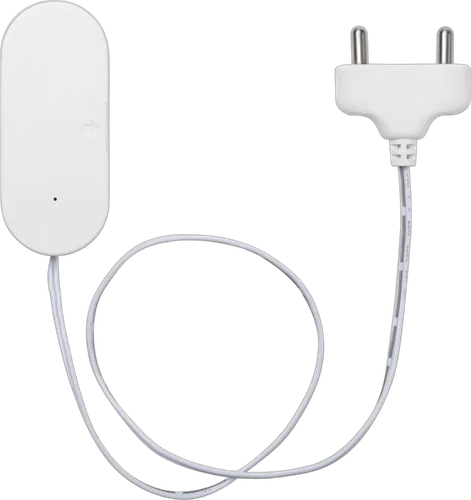
The LWL02 is a small, battery-powered LoRaWAN sensor. A white body holds the batteries and radio, and a thin lead runs to a probe with two stainless-steel pins. When water bridges the pins, the sensor reports a leak. The body screws or sticks to a wall, a floor pedestal or the side of a unit; only the probe goes where water would collect.
For a server room, that means nothing to wire and nothing to add to the network: no mains, no PoE port, no Wi-Fi and no IP address to manage. Two AAA batteries last roughly 2 to 10 years depending on how often it reports, and a daily status message confirms it's still working. It reports the moment the probe gets wet, every 10 minutes while the leak continues, and again when the probe dries out.
Two-probe detection
Stainless-steel probes on a lead. Water bridging the probes triggers a leak alert.
Instant leak alerts
Reports the moment a leak starts, every 10 minutes while it continues, and when it clears.
Daily check-in
Sends a status report once a day, so you know the sensor is still working.
Counts & durations
Keeps a count of leak events and how long the last one lasted.
Replaceable AAA batteries
2 x AAA, roughly 2 to 10 years depending on how often it reports.
Indoor sensor
The body isn't waterproof - mount it above the floor with only the probe in the wet zone. -10 to 50°C.
Specifications from Dragino's LWL02 documentation.
An Alert Path That Doesn't Depend on Your Network
A leak sensor that reports over your own LAN has an awkward weakness: the water it's warning about may already have taken out the switch, firewall or router it depends on. The LWL02 sends its messages by radio to a LoRaWAN gateway, which forwards them to Trackpac separately from the network you're protecting. That's an out-of-band path, so the leak alert has a way out even when the room itself has gone dark.
Water is only one risk in a server room. Overheating from a failed air-con unit is the other common one, and the same LoRaWAN approach works for it: see our guide to server room and comms cabinet temperature and humidity monitoring. Both sensor types sit on the same Trackpac dashboard, tagged by site, with the same alert routing.
Installing the LWL02 in a Server Room
Installation takes minutes per sensor and doesn't need a change window. The rule that matters most: the sensor body isn't waterproof, so mount it above the likely water level and put only the probe in the wet zone.
1
Order "Trackpac Ready", scan and name it
Buy the LWL02 from Hexaspot with the Trackpac Ready option, scan its QR code in the Trackpac app and give it a clear name such as "Comms room 2 - under AC unit". Tag it by site so it picks up that site's alert rules.
2
Probe under each air-con unit
Place the probe on the floor directly below the indoor unit, or where an overflowing drip tray would run to. If a pumped condensate drain runs along the wall, put the probe at its lowest point.
3
Probe at the lowest point of the floor void
Under a raised floor, find where water would gather first and lay the probe flat there. Mount the body high on a pedestal or the void wall, or above the tiles if the lead allows. No raised floor? Put the probe at the low point of the room or by the base of the rack.
4
Probe under pipe runs and near rack bases
Where pipes cross the room or run along an adjoining wall, put a probe on the floor below the joints and valves. Each LWL02 has one probe, so use one sensor per spot you want to protect.
5
Test it in place, doors and tiles closed
Touch the probe pins with a damp cloth and check the leak and the dry message both appear on the dashboard. Do it with the floor tiles back down and the cupboard door shut: metal racks, tiles and thick walls can all weaken a radio signal.
Alert Rules for IT On-Call
Leaks in comms rooms have a habit of starting on a Friday evening. Trackpac rules can alert on water leak detected and battery level, by email, SMS or push through the Trackpac mobile app, with time windows so the right people get the right messages. Rules can target a tag, so every new sensor added to a site inherits them. A few rules cover most setups:
Leak out of hours: wake the on-call
In the evening, overnight and at weekends, a leak sends an SMS and push alert to the IT on-call contact. During the working day it goes to the service desk and facilities.
Webhook: raise a ticket
Forward leak alerts by webhook into your ticketing, helpdesk or monitoring system, so each one is logged and tracked alongside your other incidents.
Dry again: resolved
When the probe dries out, a "resolved" message follows the alert, so whoever picked it up knows the water has gone.
Low battery: plan a swap
Batteries last years, so a low-battery rule makes sure a sensor in a forgotten cupboard doesn't quietly go silent. The AAA cells are user-replaceable.
The LWL02 keeps reporting every 10 minutes while a leak continues. A trigger-lock interval on the rule stops that turning into a message every 10 minutes at 3am: one alert, then quiet until the cool-down ends or the probe dries. Trackpac tells you about the water; it doesn't shut off a supply or send anyone itself.
Many Comms Rooms, One Dashboard
An MSP might look after dozens of client comms cupboards; a facilities team might have one on every floor of several buildings. Tag each sensor by client, site or floor and the Trackpac dashboard groups them for you, with alert rules attached to each tag. Every leak event is kept in the history, along with a running count of events and how long the last one lasted, which helps spot an air-con unit that overflows now and again before it becomes a bigger problem.
Read-only links for clients
Share a read-only dashboard link with a client or their building manager. They see their own sensors' status and leak history without being able to change sensors or alert rules. Reports and exports give you a record to share after an incident.
Know about a server room leak before the network does
One LWL02 under each air-con unit, at the low point of the floor void and under pipe runs - sending an alert over LoRaWAN the moment water reaches the probe, even if the room's own network is down.
€18.17 ex VAT from Hexaspot, our sister company in the Connect IoT group. VAT is added at checkout based on your country.
Choose the Trackpac Ready option and the sensor arrives pre-registered on Trackpac - scan the QR code and it's live on your dashboard.
Trackpac covers connectivity, dashboard, alerts and data storage from £15 / €18 per sensor per year.
Will a leak alert still reach me if the network in the server room is down?↓
That's the point of using LoRaWAN. The LWL02 doesn't use your LAN, Wi-Fi or an IP address: it sends its messages by radio to a LoRaWAN gateway, which forwards them to Trackpac. If water has already taken out a switch or firewall in the room, the leak alert still has a separate path out. Timing depends on LoRaWAN coverage at the site, so check the sensor reports from its final position before relying on it.
Can I put the LWL02 under a raised floor?↓
The probe, yes: the floor void is often the best place for it, at the lowest point where water would gather. The sensor body isn't waterproof, so mount it above the likely water level, for example high on a floor pedestal or the void wall, or above the floor tiles where the lead allows. Floor tiles and metal pedestals can weaken a radio signal, so test the sensor in place with the tiles back down.
Can leak alerts go into our ticketing or monitoring system?↓
Yes. Alongside email, SMS and push alerts, Trackpac can forward alerts by webhook to another system, such as a ticketing, helpdesk or monitoring tool, so a leak in a comms room shows up where your team already works. Trackpac passes the alert on; it doesn't shut off water or dispatch anyone itself.
How many LWL02 sensors does a server room need?↓
Each LWL02 has one probe, so plan one sensor per spot you want to protect. A small comms cupboard may need just one, at the lowest point of the floor or under the air-con unit. A larger server room typically needs one under each air-con unit, one or two at the low points of the floor void, and one under any pipe run near the racks.
Where can I buy the LWL02 for use with Trackpac?↓
The Dragino LWL02 is sold by Hexaspot, Trackpac's sister company in the Connect IoT group, for €18.17 ex VAT, with VAT added at checkout based on your country. Choose the 'Trackpac Ready' option and the sensor is pre-registered on Trackpac, so you only need to scan its QR code. A Trackpac subscription from £15 / €18 per sensor per year covers connectivity, the dashboard, alerts and data storage.